 Price Action
 Ten classic price action setups, traded automatically on MetaTrader 5
Major trend reversals, final flags, breakouts, High 2 / Low 2 pullbacks, wedges, channels, measured moves, trading-range reversals, opening reversals and breakout tests — each one coded as an exact rule with a stop-order entry, a protective stop and a target.
- 10 setups
- Stop-order entries
- Portfolio from one chart
- Risk-based sizing
- Telegram + screenshots
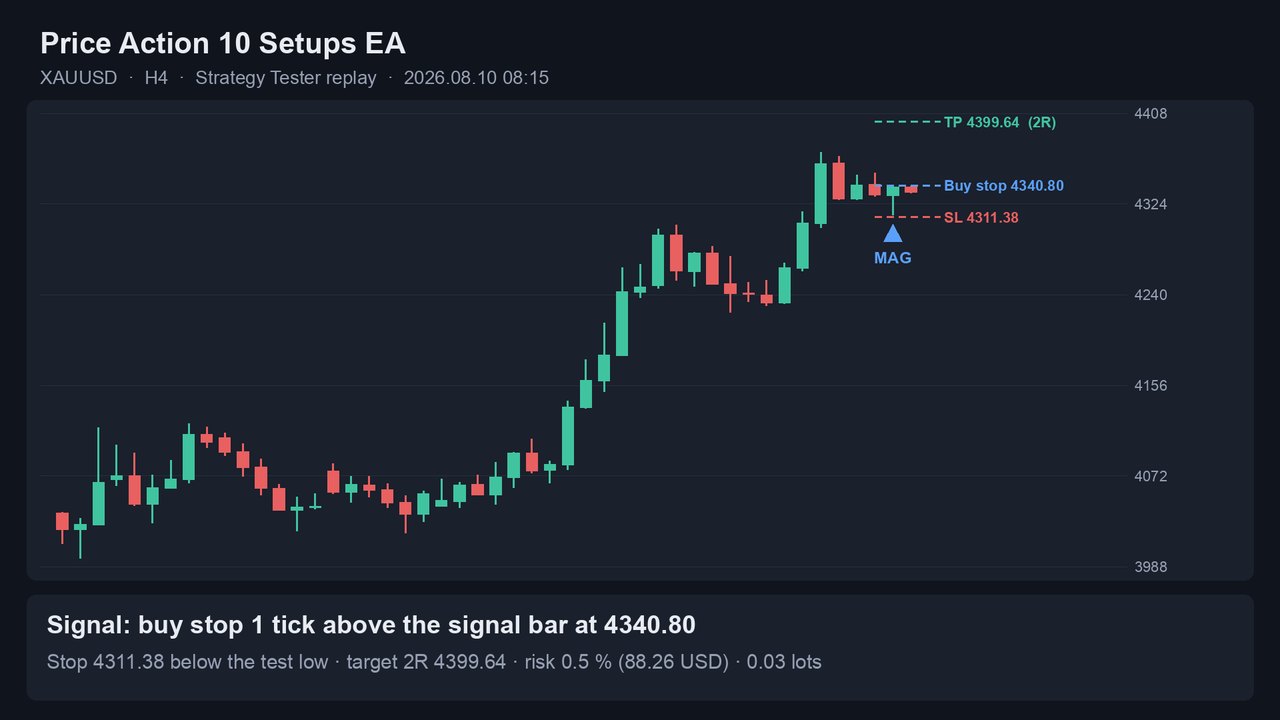
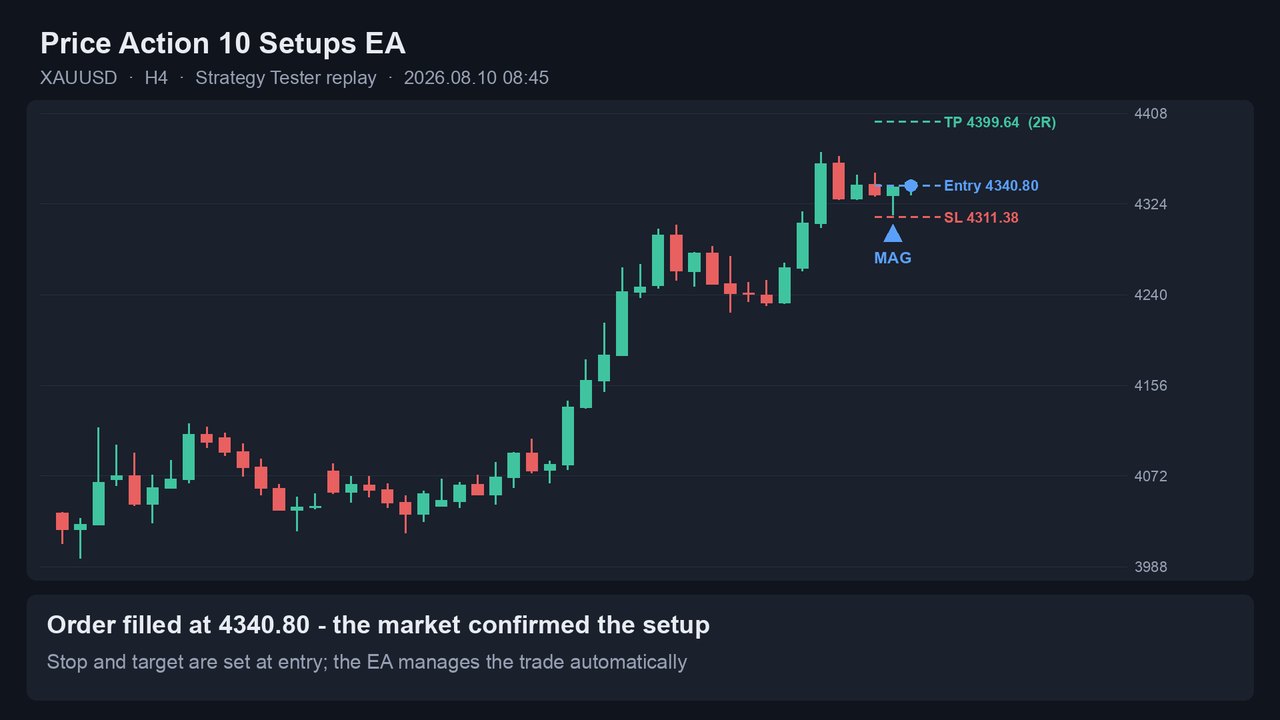
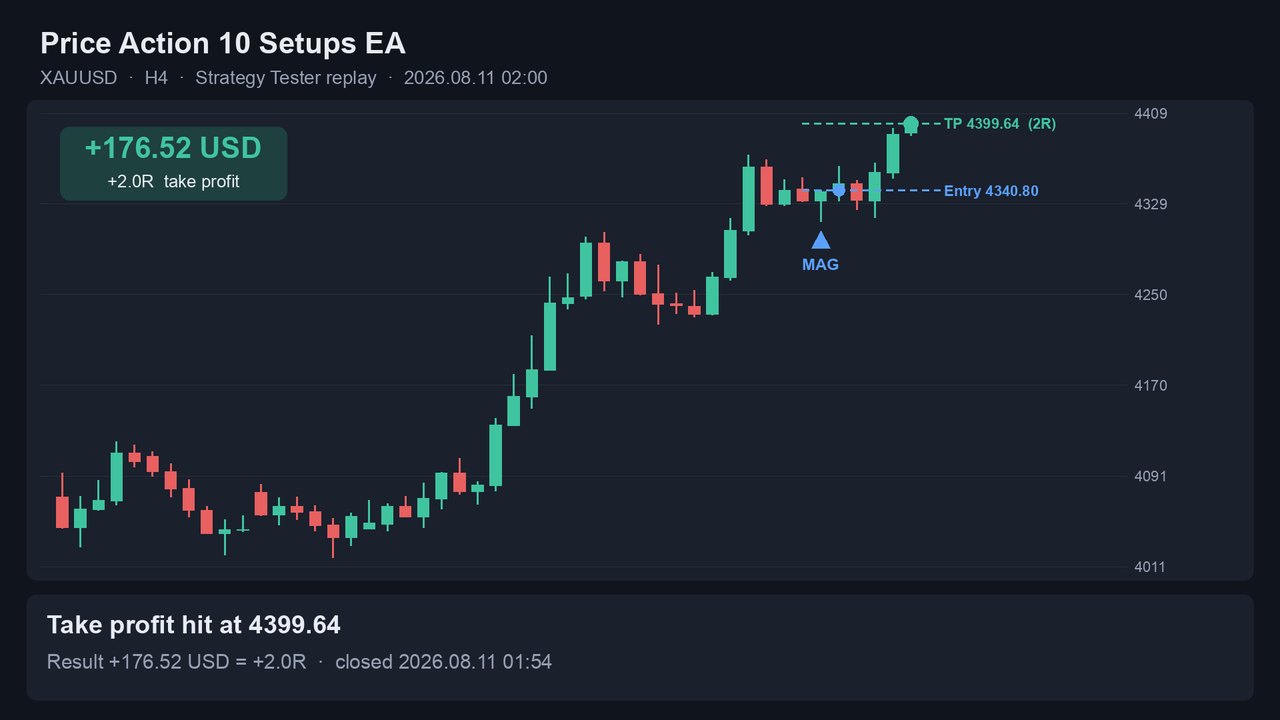
One trade, bar by bar
A replay of a real Strategy Tester trade from the default H4 settings: XAUUSD pulls back to a broken high, prints a bull signal bar, the buy stop triggers and the 2R target is hit (+176.52 USD on a 10 000 USD account at 0.5 % risk).
The ten setups
The patterns that discretionary price action traders rely on most, turned into rules a computer can follow the same way every time. Long and short rules are exactly symmetric, and every distance is measured in ATR so the same settings work on forex, gold, indices and oil.
MTRMajor trend reversal
A trend, a counter-move that breaks the trend line (closes beyond the 20 EMA), then a test of the extreme — enter on the reversal.
FFFinal flag
Late in a trend, a small horizontal flag breaks out to a new extreme and fails — enter the reversal back through the flag.
BOBreakout
A strong trend bar closes beyond the recent range — enter on follow-through, target the measured move of the range.
H2L2High 2 / Low 2
A two-legged pullback to the EMA area in a trend — enter on the second-leg signal bar.
WDGWedge
Three pushes against the trend with bounces in between — enter the reversal after the third push.
CHChannel
The trend channel line through the last two swing points is tested again — enter the reversal at the line.
MMMeasured move
Leg 1, a 30–70 % pullback, then entry for leg 2 = leg 1, with the target at the projection.
TRRTrading-range reversal
Flat EMA and two-sided trading; a test or failed breakout of the range extreme — enter toward the other side.
OROpening reversal
Within 90 minutes of the London or New York open, a fast move into a magnet reverses — enter the reversal.
MAGMagnet / breakout test
After a breakout of a swing point or the prior-day high/low, price returns to test the level — enter the continuation.
How it trades
- Signal barOn the close of a bar the EA checks every enabled setup. The signal bar must be a trend bar that closes near its extreme.
- Stop order one tick beyond the barBuy stop above a bull signal bar, sell stop below a bear signal bar — the market has to confirm the setup by trading through it.
- Stop and target at entryStop beyond the setup extreme plus a small ATR buffer; target = the setup's measured move or range target, otherwise 2R.
- No confirmation, no tradeAn order that is not triggered within one bar is cancelled. Orders are only sent while the symbol's session is open.
A whole portfolio from one chart
The Symbols input lists the markets to trade, each with its own setups — for example XAUUSD:BO|MAG|CH,AUDJPY:WDG. Attach the EA to any one chart; the signal timeframe is an input, so the chart's symbol and timeframe do not matter.
| Portfolio | Signal TF | Symbols input |
|---|---|---|
| H4 (default settings) | H4 | XAUUSD:BO|MAG|CH,AUDJPY:WDG |
| H1 | H1 | USDJPY:MM,EURUSD:FF,GBPUSD:FF,XAUUSD:FF|MTR,USTEC:OR,US30:H2L2,JP225:MTR,AUDUSD:TRR |
| M15 | M15 | US30:OR,JP225:TRR,XAUUSD:TRR,USTEC:OR |
| Gold only | H4 | XAUUSD (all ten setups) |
Broker names are resolved automatically (suffixes such as .a, m, # and aliases), preferring the symbol your account can actually trade. Each setup has its own magic number, so results per setup are easy to read in the history.
Backtests
MetaTrader 5 Strategy Tester, every tick based on real ticks, IC Markets data, January 2022 – October 2026, 10 000 USD start, 0.5 % risk per trade (compounding).
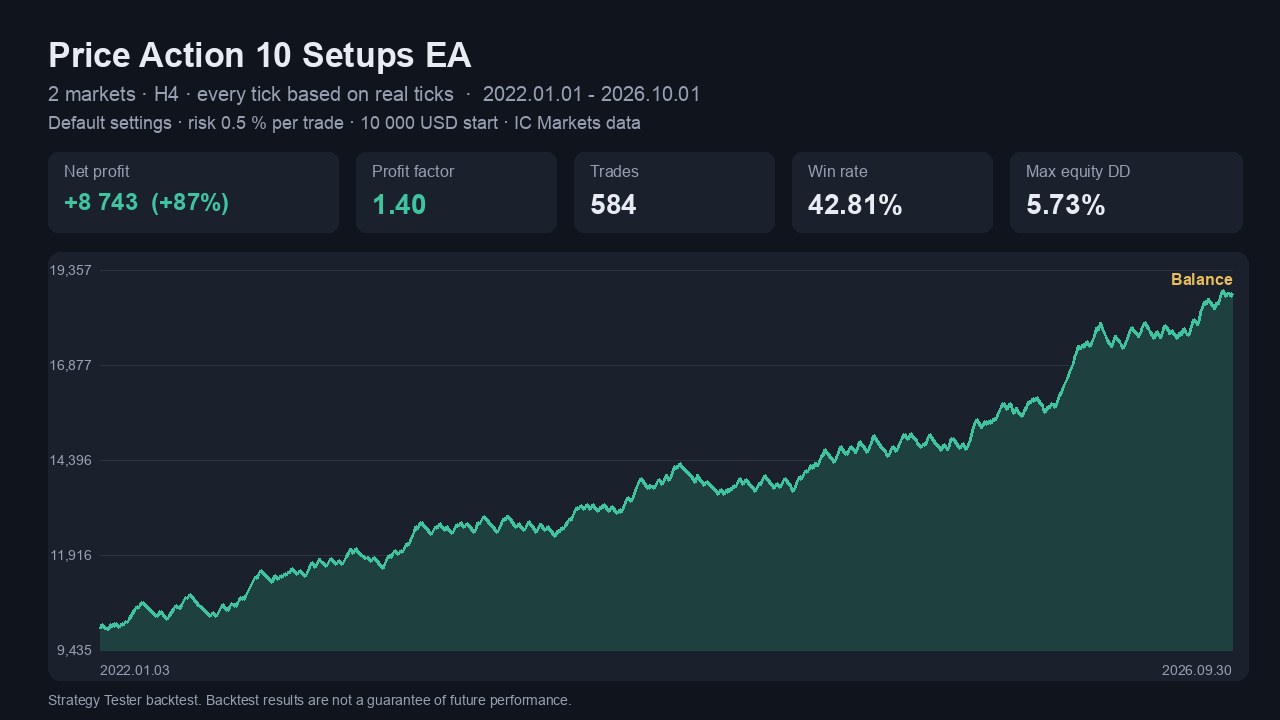
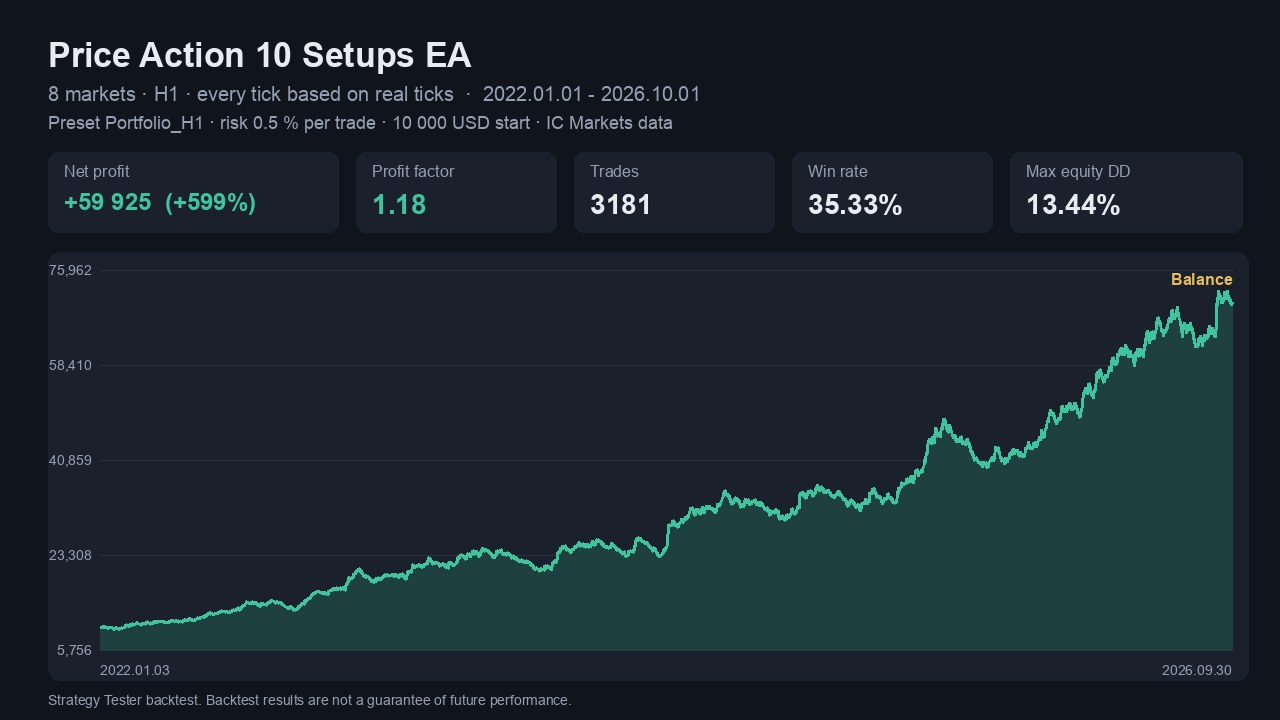
| Portfolio | Net profit | Profit factor | Trades | Win rate | Max equity DD |
|---|---|---|---|---|---|
| H4 (default) | +8 743 USD (+87 %) | 1.40 | 584 | 42.8 % | 5.7 % |
| H1 | +59 925 USD (+599 %) | 1.18 | 3 181 | 35.3 % | 13.4 % |
| M15 | +22 711 USD (+227 %) | 1.11 | 2 946 | 34.9 % | 13.9 % |
Risk control and Telegram alerts
Built to run unattended on a VPS, and to keep you informed when it does.
Position sizing
Risk % of balance (default 0.5 %), fixed money or fixed lots, sized from the stop distance.
Margin & volume checks
The lot is reduced until it fits the free margin; broker volume limits are respected.
Cost filters
Maximum spread as a fraction of ATR and a minimum stop of four spreads.
Optional exits
Break-even at N × R, time exit after N bars, trading-hours filter, higher-timeframe trend filter.
Telegram events
Signal, fill, close (P/L in money and R), cancel, break-even, errors, start/stop and a daily summary — each on or off.
Chart screenshots
Optional screenshot with signals, fills and closes; the signal bar is marked with the setup code. Filter messages by setup.
FAQ
Which brokers and accounts does the EA work with?
Any MetaTrader 5 broker, hedging or netting accounts. Broker symbol names such as EURUSD.a, XAUUSDm or GOLD are resolved automatically, and the EA picks the variant your account can trade. ECN / raw-spread accounts are preferable for the H1 and M15 portfolios.
Does the EA guarantee profits?
No. All published results are Strategy Tester backtests, and the portfolios were chosen using the whole 2022–2026 history, so past results overstate what to expect. Test on a demo account first.
Which timeframe and chart should I attach it to?
Any chart. The signal timeframe is the Signal timeframe input (default H4) and the markets come from the Symbols input. See the user guide.
Can I run several portfolios at once?
Yes — one EA per portfolio on separate charts, each with its own magic number. When running the H4, H1 and M15 portfolios together, use about half the risk per trade.
Do I need a VPS?
The EA has to run while the markets are open, so a VPS (or a computer that stays on) is recommended.
My terminal says "has newer unsupported version, please update your client terminal".
Version 1.1 is built to run on older MetaTrader 5 builds. Update the product from the Market tab of your terminal, or update the terminal via Help → Check for updates.
How do I set up Telegram alerts?
Create a bot with @BotFather, enter its token and your chat id in the inputs, and allow WebRequest for https://api.telegram.org in Tools → Options → Expert Advisors. Step-by-step instructions are in the user guide.
Trade the setups, not your impulses
Exact rules, the same execution every time, and alerts on your phone.
Get Price Action 10 Setups EA Read the user guide